From writing files directly to Salesforce to new workflow publishing controls, improving new user onboarding, and creating more branded end-user experiences with custom domains, these Intellistack Streamline product updates help teams stay organized and in control throughout their workflow building experience.
NEW: subscribe to receive release notes as soon as they are published. Simply click on “Follow” in the new release notes section of the Formstack Help Center and Intellistack Streamline Help Center.
Complete the loop: write files directly to Salesforce from your workflows
You can now write files directly to Salesforce from your Intellistack Streamline workflows, making it easier to keep documents and records connected without extra uploads or handoffs. This helps teams close the loop faster and keep Salesforce up to date as work gets completed.
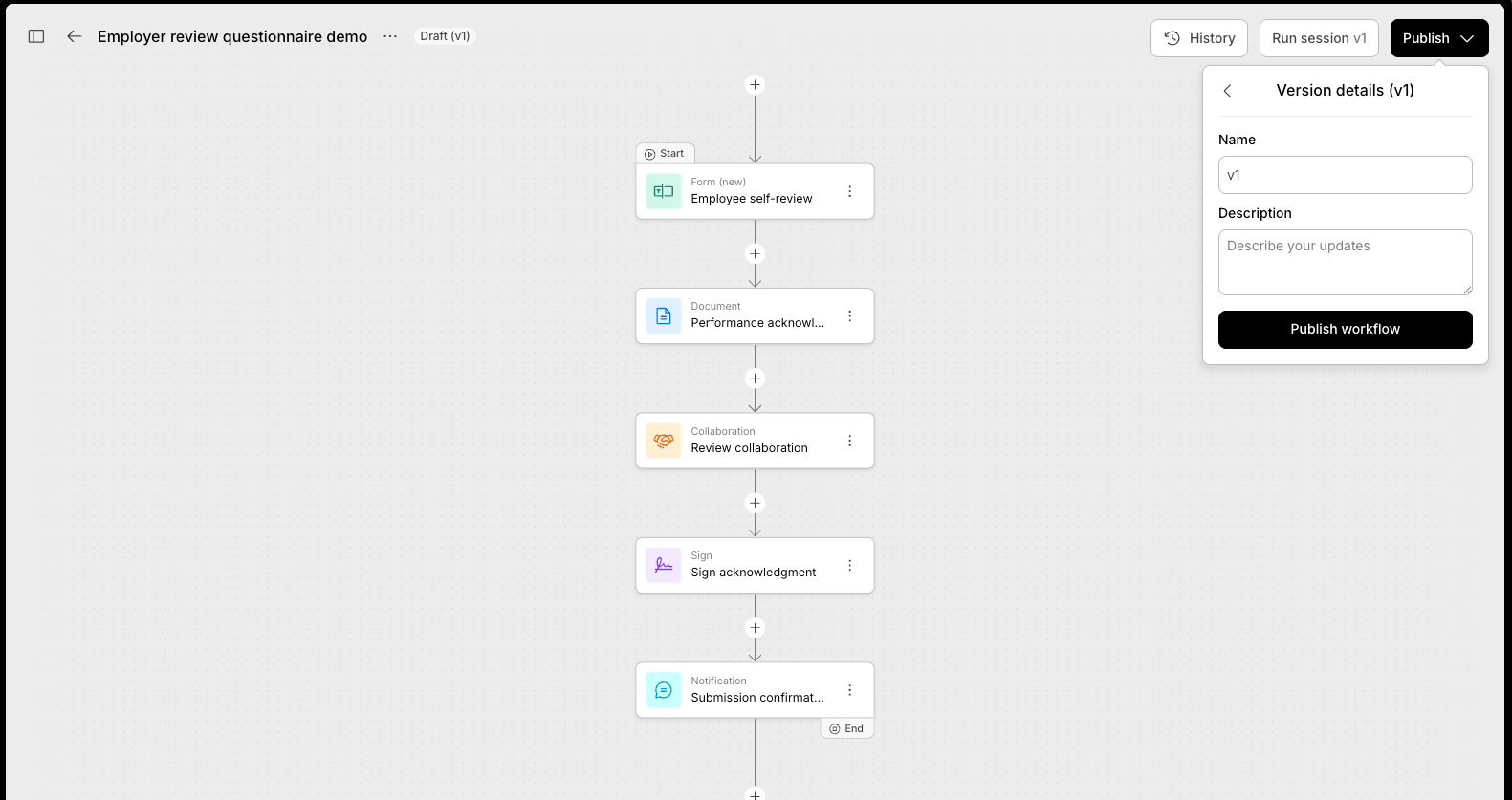
Choose when workflow changes go live in your Streamline workflows
Publishing completed documents or workflow outputs in Intellistack Streamline is now more comprehensive with our Publish setting. You can iterate freely while auto-save tracks your draft. Use the Publish feature once you’re ready to go live.
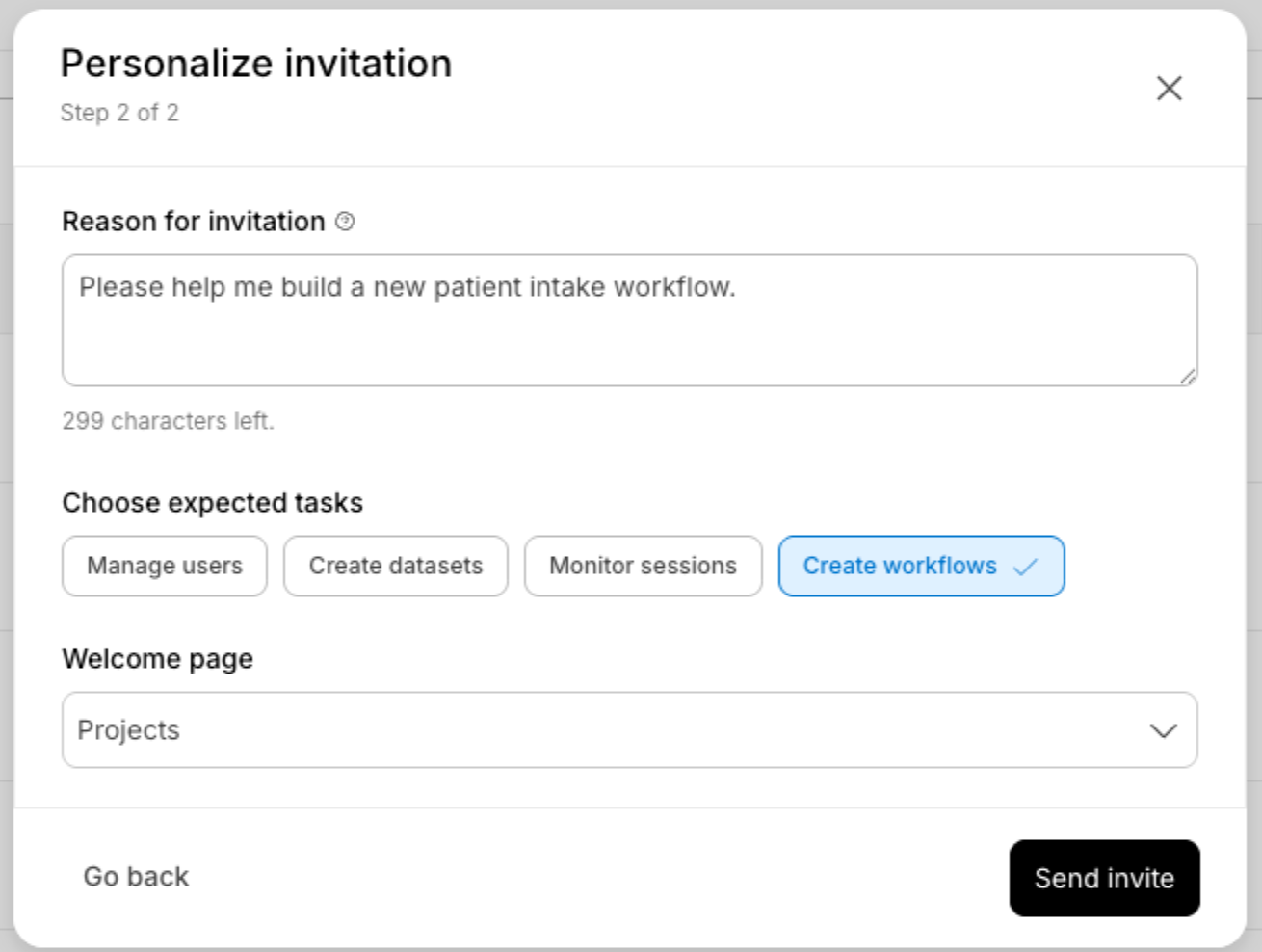
Set up new users with the right access, context, and starting point, before they log in
Getting new Intellistack Streamline users started is now easier and personalized with new user setup controls. Admins can define the right access, context, and starting point before a user ever logs in, helping teams onboard faster and reduce confusion from day one.
Capture and standardize SSN, EIN, and other data with custom string formatting
With custom string formatting, teams can capture and standardize values in Streamline workflows like SSNs, EINs, and other structured data more consistently. This helps improve data quality at the point of entry and reduces cleanup later in the workflow.
Org level end user custom domains
Intellistack Streamline now supports org-level end user custom domains, giving organizations a more branded workflow experience from start to finish. End users see familiar URLs across their session helping reinforce confidence that they are interacting directly with the organization they trust.
Microsoft Teams event integration
Integrate Inellistack Streamline with Microsoft Teams, making it easier to send updates and keep work visible where collaboration is already happening. This helps reduce delays and keeps stakeholders informed without switching tools. Builders select a team and channel, compose messages with dynamic data from earlier workflow steps, and let Streamline handle delivery automatically. The integration returns a direct link to each posted message, so downstream steps can reference exactly what was sent.
March 2026 Release Notes
Continue exploring this month’s updates for Formstack products and Intellistack Streamline by reading the full release notes below. You can also view full release notes from previous months in the release notes section of the Formstack Help Center and Intellistack Streamline Help Center.
Formstack Admin Center
- Added the capability in Formstack Admin for users to edit their own email addresses.
Formstack Forms
Defect Fixes
- Fixed an issue where Portals did not indicate completed status for regular users.
- Fixed an issue where the discount code did not reflect the currency of the discounted field.
- Fixed an issue where there was a delay in scheduled exports.
- Fixed an issue where importing CSV into SmartLists would fail when the data included special characters.
- Fixed an accessibility issue for form error message processing.
- Added an accessibility feature to edit alt text to header and footer images in a custom theme.
- Added the requirement to disable payment fields on forms with custom javascript that had not been reviewed and attested..
- Fixed an issue where the Add to Waitlist feature was charging the first person.
- Fixed an issue to return subfolders in the API when using API GET https://www.formstack.com/api/v2025/folders/{folderId}
- Fixed an issue where resending submissions to Google Sheets did not include submission edits.
- Fixed an issue where URL Prefill links were not populating some fields properly.
Formstack Documents
Defect Fixes
- Fixed an issue where PDF templates were not populating some embedded images.
- Fixed an issue where 'lower' modifier was not working with 'strip_tag' modifier.
- Fixed an issue where emails weren't delivered to emails listed multiple times with different casing.
Formstack Sign
Defect Fixes
- Fixed an issue where Microsoft Outlook clients were not respecting email formatting.
- Fixed an issue where Text Tags from Formstack Docs were not being placed on the document in the right place.
- Added the ability to use the FSID Personal Access Token within Sign API v2.
- Fixed an issue where email clients were translating 'Review and Sign' button to a non-clickable link.
- Fixed an issue where emails were not being sent for documents created through the API.
- Fixed an issue where fillable fields were not being placed on the document in the right place.
Formstack Workflows
- SMS Delivery for Sign Documents in Workflows — Workflows now supports SMS delivery when sending Sign documents. When configuring a Sign step, you can add a participant's mobile number alongside their other contact details — just like in standalone Sign — and choose between entering a fixed number or mapping one dynamically from data collected earlier in your workflow.
Defect Fixes
- Fixed an issue where Microsoft Outlook clients were not respecting email formatting.
- Fixed an issue where Text Tags from Formstack Docs were not being placed on the document in the right place.
- Added the ability to use the FSID Personal Access Token within Sign API v2.
- Fixed an issue where email clients were translating 'Review and Sign' button to a non-clickable link.
- Fixed an issue where emails were not being sent for documents created through the API.
- Fixed an issue where fillable fields were not being placed on the document in the right place.
Formstack Forms for Salesforce
Versions: v4.146 through v4.147
v4.147
- Improved custom formula evaluation with safer parsing, broader support for approved functions and member calls, and better fallback behavior for legacy formulas.
- Fixed a potential SQL injection risk caused by string-based query concatenation.
- Added Authorize.net support for native forms, including the related configuration option in Salesforce.
v4.146
- Salesforce Spring '26 API Upgrade - Updated package metadata to Salesforce API v66 for compatibility with Spring '26.
- Fixed an issue where hyperlinks added through rules were not working correctly.
- Fixed an issue where form emails could display the wrong input value.
- Improved Lightning Web Runtime site compatibility by adding Site object fallback handling.
- Added support for additional XML submission storage fields, including XML4 and XML5, to better handle larger submission payloads.
- Added XML capacity validation to help prevent oversized form submissions from causing downstream processing issues.
Formstack Documents for Salesforce
Versions: v1.369 through v1.375
v1.375
- Fixed an issue where bulk document generation could fail with a "Regex too complicated" error when field mappings used multi-line or heavily indented SOQL queries.
v1.374
- Fixed cross-record data contamination in High-Volume Generation caused by missing bind-variable fields in bulk SOQL queries.
- Fixed an issue where portal users in Experience Cloud could not perform document merges triggered from Salesforce Flows.
v1.372
- Fixed an SOQL N+1 governor limit issue in document generation for records with large numbers of child items.
v1.371
- Fixed an Apex CPU timeout in document generation by extending Schema describe caching to additional merge paths.
v1.370
- Fixed a CPU timeout in MetaInfo by caching Schema describe results during document generation.
v1.369
- Salesforce Spring '26 API Upgrade - Updated the package to Salesforce API v66 for compatibility with Spring '26.
- Added field mapping search on the Mapping page, making it easier to find specific mappings in documents with large numbers of fields.
- Fixed an issue where generating a merge with the File feature and child relationship Files mapping could hit the SOQL 201 query governor limit.
- Fixed an issue where SOQL field mappings with subqueries incorrectly added the lookup field to the subquery SELECT clause, causing query failures.
Intellistack Streamline
New features:
- Event Integration: Microsoft Teams - Organizations standardized on Microsoft 365 can now route workflow-generated notifications straight to their Teams channels. Builders select a team and channel, compose messages with dynamic data from earlier workflow steps, and let Streamline handle delivery automatically. The integration returns a direct link to each posted message, so downstream steps can reference exactly what was sent.
- Event Integration: Excel Online - Streamline added support for writing workflow data to Excel Online spreadsheets, bringing the same capabilities previously available for Google Sheets to Microsoft customers. Organizations standardized on Microsoft Excel could automatically populate their workbooks with workflow outputs, enabling audit logs, data collection, and reporting.
- File Write Out to Salesforce - Workflows can now write files directly back to your connected Salesforce data sources. When your workflow generates documents, PDFs, or images, you can store them alongside the related record in Salesforce - no separate file storage integrations required. This keeps your data complete and your workflows simpler.
- Workflow Error Visibility - We added better tools to surface and explain workflow session failures as they happen. By making errors easier to understand and notifying builders when sessions break, this update helps teams keep workflows healthy, reliable, and ready for end users.
- Enhanced User Invitation System - We replaced the previous user invitation flow with a guided, two-step process that lets Admins and Managers fully onboard a new user before they ever log in. In addition to assigning role, groups, and project access upfront, inviters can write a personal message and choose a custom landing page for the new user's first session. The result is a personalized invitation email and a first-login experience that gives every new user immediate clarity on their role and where to start.
- Add addendums in the Collaboration space - It is common for additional documents to be supplied during active negotiations. These documents need to go through redlining. We made an enhancement to the collaboration space so that these addendums can now be added to documents and will be part of the final, combined document output.
- SSN, EIN, and Basic String Formatting - Collecting structured data just got smarter. Form builders can now apply preset formats to SSN, EIN, percentage, and currency fields - so data is captured correctly the first time, every time.
- SCIM User Provisioning - User accounts now sync automatically between your Identity Provider and Streamline.
- Create, update, or deactivate users in Okta, Azure Entra ID, or other SCIM 2.0–compliant IdPs and those changes flow to Streamline without manual steps.
- New users appear as soon as they’re assigned in the IdP; name, email, and role changes propagate; and deactivated users are marked in Streamline and stop receiving notifications.
- Configuration is done in your IdP and in Streamline’s SSO Setup Suite.
Available on all plans for organizations with SSO already set up with Streamline.
Note: SSO must be configured with Streamline (SAML or OIDC). The IdP must support SCIM 2.0.
- Publish [Versioning] — Streamline workflow builders now have full control over when changes go live with a dedicated draft and publish experience. Make edits freely, test your draft before anyone sees it, and publish with a single click when you're ready. In-progress sessions always complete on their original version - so your users get a seamless experience every time.
- Org Level End User Custom Domains — Streamline now supports custom domains to deliver a fully branded workflow experience. End users see familiar URLs across their session helping reinforce confidence that they are interacting directly with the organization they trust.
- Multi-User Editing Project at One Time — Teams working in Streamline no longer have to worry about stepping on each other's changes. When someone is actively editing a project, other users receive a clear notification and the system prevents simultaneous edits that could cause save failures. This gives teams the confidence to collaborate on projects without the risk of losing work.
Defect fixes:
- Fixed an issue where webhook data wasn't being processed in the correct format, ensuring webhooks now work properly with automated workflows.
- Fixed an issue where submitting the same search request multiple times would cause an error on the search results page.
- Fixed an issue where leaving date fields empty in search forms would cause an error and prevent search results from loading.
- Fixed an issue where signature field settings would not automatically open when adding a signature field to a document. The settings panel now opens immediately, making it easier to configure signature requirements.
- Fixed an issue where the days filter dropdown and page navigation weren't working properly in the session history table within workspaces.
- Fixed an issue where documents could be processed without required signer contact details, ensuring all necessary information is now properly validated before proceeding.
- Fixed an issue where due dates were not working properly when using the quick send feature for document signing.
- Fixed an issue where an error message would appear when working with form fields in the Dynamic builder.
- Fixed an issue where users weren't seeing a clear "Link expired" message when trying to access a signing document after its due date had passed.
- Fixed an issue where form input fields were not displaying the correct brand colors.
- Fixed an issue where forms would not recognize information that was automatically filled in by your browser, requiring you to manually re-enter the data.
- Fixed an issue where default values were not appearing when building or previewing content.
- Fixed an issue where users couldn't remove the country code from required phone number fields.
- Fixed an issue where pop-up windows would appear distorted or incorrectly formatted on screen.
- Fixed an issue where tables weren't properly marked as required when building forms for Excel Online. This ensures required table fields now work correctly and prevent form submission when left empty.
- Fixed an issue where the project sessions interface was difficult to navigate and use. Users can now enjoy a more intuitive and streamlined experience when managing their project sessions.
- Fixed an issue where webhook configurations would lose certain field settings and not save properly.
- Fixed an issue where search filters would accept incorrect values and cause searches to fail unexpectedly.
- Fixed an issue where invalid authentication tokens in webhook requests were causing system errors instead of being properly rejected with appropriate warnings.
- Fixed an issue where documents weren't being properly saved when the collaboration step was removed from a workflow.
- Fixed an issue where the wrong session information was shown on document pages in the repository.
- Fixed an issue where renaming a form would break existing rules and cause other form features to stop working properly.
- Fixed an issue where documentation was unclear about what information was required, making it easier for users to understand what details they need to provide.
- Fixed an issue where the form builder would not load properly for some forms, preventing users from editing or updating their forms.
- Fixed an issue where selecting a state from the dropdown menu in the address field would cause the form builder to stop working.
- Fixed an issue where users were unable to set up field comparisons when working with copied forms.
- Fixed an issue where chat conversation titles weren’t being automatically generated by AI when they shouldn't have been.
- Fixed an issue where the Omni button was hidden behind other interface elements, making it inaccessible to users.
- Fixed an issue where the Streamline workflow would not work properly on 6th generation iPads.
- Fixed an issue where the page builder would not display correctly in Safari browsers, ensuring all design tools now work properly across different web browsers.